

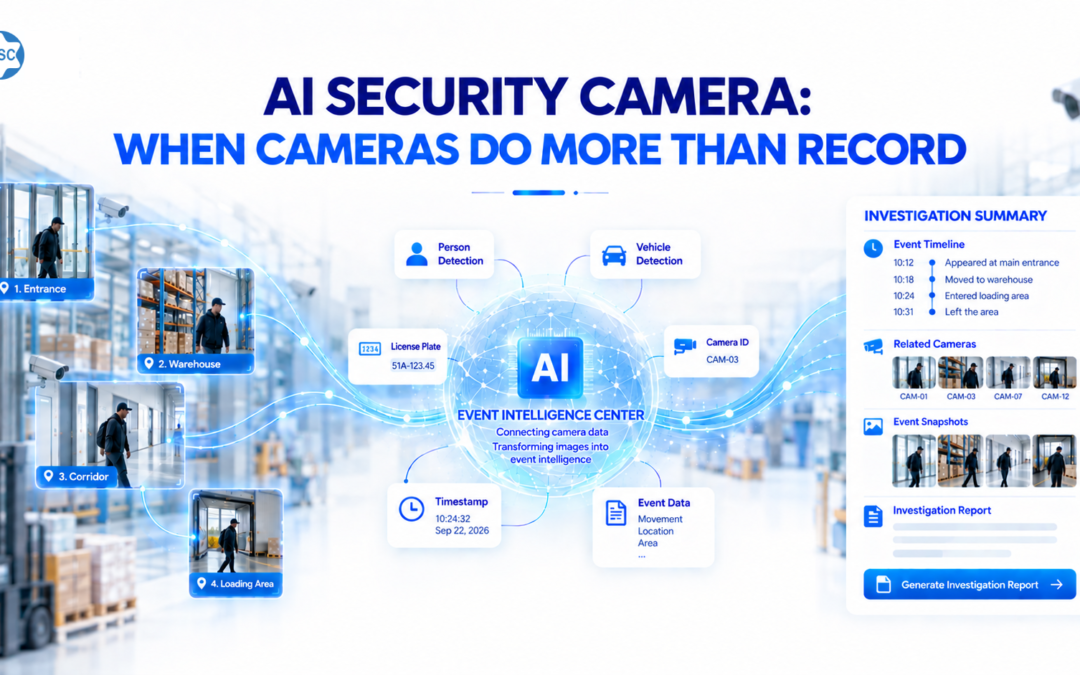
Detection → Event Logging → Multi-Camera Linking → Tracking → Reporting
A stranger passes through 7 cameras in a factory. How long would it take you to reconstruct that person’s entire journey?
10 minutes? 30 minutes? Or would you have to open each camera, select each time range, and review hours of video?
What if AI could automatically detect people or vehicles, record event data, link cameras, and reconstruct the entire event timeline?
This is the approach behind AI Security Camera: transforming a camera system from a place that stores video into a searchable source of security data that can be traced and compiled into reports.
What is AI Security Camera?
AI Security Camera is a solution that uses AI to analyze camera footage, detect objects or events of interest, record event data, and help operators trace events.
Instead of only: Camera → Recording
Camera → Detection → Logging → Linking → Tracking → Reporting
The key is not simply whether AI can recognize a person or read a license plate. The greater value lies in the question: After detection, what can the system do with that data?
1. Detection: Cameras Begin to “Understand” What Is Happening
Imagine a vehicle appearing at a factory gate at 22:47.
A conventional camera records the footage. With AI Security Camera, the system can be designed to analyze and record multiple pieces of information related to the event, such as:
- Detecting the vehicle.
- Reading the license plate.
- Identifying certain vehicle characteristics.
- Recording the time.
- Identifying the camera and location.
- Recording the direction of movement.
- Saving related images or video clips.
At this point, the camera does more than create video. It begins generating event data.
2. Event Logging: An Event Is No Longer Just a Video Clip
This is something not every business considers when investing in a camera system: there may be a huge amount of video, but very little data that can actually be searched later.
Suppose a person appears unusually in front of a warehouse at 2:00 AM. Instead of having only one long video, the AI system can create an event record:
- Event: Person detected
- Time: 02:13 – 02:18
- Area: Warehouse A
- Camera: CAM-08
- Object: Person
- Image: Event snapshot
- Activity: Appears → moves → remains in the area → leaves
When each event is converted into structured data, searching for it later becomes completely different.
3. Multi-Camera Linking: A Person Appearing in Multiple Places Is Still One Event to Track
One of the biggest challenges with camera systems is not a lack of footage — it is that the footage is scattered across too many cameras.
For example, a person moves through: 22:01 — CAM 01 — Gate A → 22:03 — CAM 04 — Lobby → 22:05 — CAM 07 — Corridor → 22:08 — CAM 12 — Warehouse.
If handled manually, staff must open each camera one by one and review the video. AI Security Camera aims to link related appearances into a connected sequence of events.
The movement timeline can be presented as: 22:01 → 22:03 → 22:05 → 22:08.
4. Tracking: Don’t Search for Video — Search for Events
If you still have to remember which camera to open every time an incident occurs, the camera system remains highly dependent on people.
An operator may need to search for: “The vehicle with license plate XXX that appeared last night.” The system can help return related appearances, including time, location, camera, and image/video.
Or: “Find the cameras where this person appeared between 22:00–23:00.”
Instead of requiring users to search through each video themselves, the system focuses on finding data related to the object or event being investigated. This is the difference between Video Search and Event Search.
5. Reporting: Turning Camera Data into Usable Information
Detecting an event is only the first step. Once the data has been recorded and linked, the system can help compile it into an event report.
- Event type: Unusual person detected
- Start time: 02:13
- End time: 02:18
- Location: Warehouse A
- Related cameras: CAM-08, CAM-10, CAM-12
- Timeline: Gate → Corridor → Warehouse
- Related images: Snapshots at each point in time
- Related video: Video clips of the event
- Activity: Sequence of activities recorded by the system
Instead of manually compiling information from multiple cameras, the data is organized around the event that needs to be handled.
What Can AI Security Camera Monitor?
Depending on the use case, camera placement, image quality, data, and AI models deployed, the system can support a variety of applications.
| Use Case | Data AI Can Record |
| Vehicle | License plate, vehicle type, time, location, direction of movement |
| Person | Appearance time, location, camera, image, related journey |
| Unknown Person | Appearances, area, time, related history |
| Restricted Area | Person/vehicle entering a defined zone |
| Unusual Event | Object, location, time, activity |
| Tracking | Camera sequence and appearance timeline |
| Event Report | Timeline, cameras, images/video, and related event data |
How Is an AI Camera Different from a Conventional Surveillance Camera?
Conventional camera: Records what happened.
Camera with AI: Detects what is happening.
AI Security Camera: Turns what cameras see into data that businesses can search, link, track, and use to handle events.
AI Security Camera should not be understood simply as “a camera that recognizes people and vehicles.” Recognition is only the first step.
Does AI Security Camera Require Replacing All Existing Cameras?
Not every project requires replacing the entire existing camera system.
Camera → Video Stream → AI Analysis → Event Data → Search/Tracking → Dashboard/Report
The ability to reuse existing cameras depends on the actual system, including camera type, image quality, viewing angle, connection protocols, network infrastructure, servers, and the AI requirements of each use case. Therefore, the camera system should be assessed and the exact problem to be solved should be defined before implementation.
What Types of Businesses Can Consider AI Security Camera?
- Factories and industrial parks — monitoring gates, restricted areas, people, and vehicles.
- Warehouses and logistics centers — tracking vehicles, people entering and leaving, and events in warehouse areas.
- Buildings and offices — supporting security event management across multiple areas.
- Parking facilities — recording vehicles, license plates, time, and entry/exit history.
- Retail chains — managing large numbers of cameras across multiple locations.
- Security-controlled areas — supporting the detection and tracking of events that require attention.
Frequently Asked Questions About AI Security Camera
Can AI Security Camera Track a Person Across Multiple Cameras?
The system can be designed to link related appearances across multiple cameras to help build a timeline. Actual performance depends on image quality, camera placement, system architecture, and the AI models used.
Can AI Security Camera Track Vehicles?
A use case can be built using data such as license plate, vehicle type, time, camera, location, and appearances to support vehicle tracking.
Can AI Automatically Generate Event Reports?
Once event data has been structured, the system can be designed to compile fields such as time, location, camera, images, video, and timeline into a report.
Can Existing Cameras Be Used?
In some systems, yes. However, cameras, video streams, resolution, viewing angles, network conditions, and recognition requirements need to be assessed before integration feasibility can be determined.
Can AI Security Camera Completely Replace Security Staff?
A more appropriate goal is to help people detect, search, and process large volumes of camera data faster, rather than treating AI as a complete replacement for security operations.
From Thousands of Hours of Video to Traceable Data
Don’t let cameras merely store what has already happened.
A modern security camera system can go far beyond recording:
Detection → Logging → Linking → Tracking → Reporting
The question then changes from “Did the camera capture it?” to: “How quickly can the system help me reconstruct the entire event?”
This is what AI Security Camera can enable: turning thousands of hours of camera footage into searchable and traceable security data.
AI Security Camera Consulting for Businesses
If your business already has a camera system and wants to apply AI to detect people/vehicles, record events, link multiple cameras, track activity, and generate reports, ICSC can work with you to identify the right use case and implementation approach.
ICSC – AI Solutions for Businesses
Email: info@icsc.vn
Contact ICSC for consultation on an AI Security Camera solution suited to your camera system and real-world operational needs.