
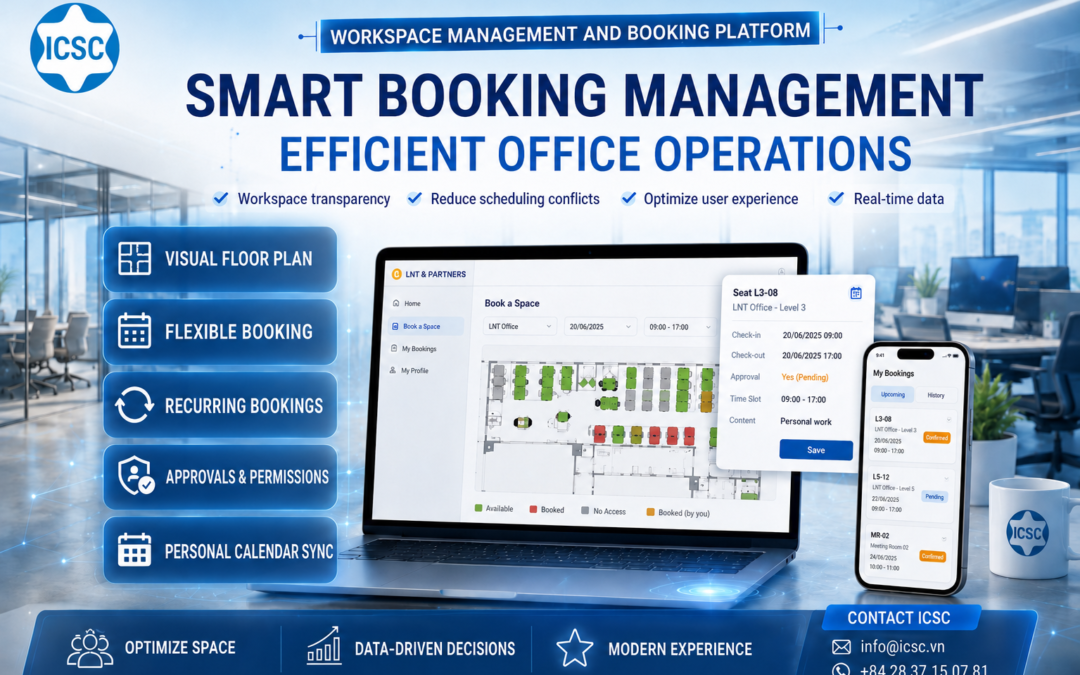
For many years, the office was viewed as a fixed space: each person had their own desk, each meeting room had its own schedule, and all changes were handled via text message, email, or an internal Excel spreadsheet. This management style was suitable when the work model was stable, the number of employees didn’t fluctuate much, and the space requirements weren’t overly complex. But as businesses entered a more flexible operating phase, the office was no longer simply a place to “be present.” The office became an operational asset that needed to be measured, optimized, and managed in real time.
That’s also why workspace booking systems are starting to play a crucial role in businesses’ digital transformation strategies. Beyond simply helping employees book a seat or meeting room, a modern booking platform allows businesses to see how space is being used, identify frequently overloaded areas, identify underutilized resources, determine which schedules require approval, which users are authorized to book which areas, and what data can support managers in making faster decisions.
On icsc.vn, ICSC typically approaches digital transformation by linking technology with practical operational efficiency: standardizing processes, modernizing systems, leveraging data, and upgrading decision-making capabilities for businesses. ICSC’s content on digital transformation emphasizes that businesses need not only to “digitize” operations, but also to shift from data management to data-driven decision-making; and ICSC positions itself as a partner in the journey of modernizing processes, software, and technology infrastructure.
With that in mind, the workspace management and reservation system developed by ICSC should not be viewed as merely an auxiliary tool for office administration. It is a class of technology that helps businesses reshape how they use space, reduce waste, increase transparency, and create a more modern work experience for their employees.
When the office is no longer just a place to sit and work.
A modern business doesn’t just need more desks. What a business needs is to use the right space, at the right time, with the right people, and for the right purpose.
In the context of the increasing popularity of hybrid working models, hot-desking, shared meeting rooms, and flexible scheduling, traditional space management reveals many bottlenecks. Employees arrive at the office but are unsure of available spaces. Meeting rooms are booked through multiple channels, leading to scheduling conflicts. Some areas are overutilized while others are almost empty. Management lacks sufficient data to determine whether the current space is being utilized effectively.
The problem isn’t that businesses lack space. The problem often lies in the fact that businesses lack a sufficiently transparent system to manage that space.
Workspace booking systems address this problem by bringing all booking activities onto a centralized platform. Employees can proactively view office floor plans, select areas, choose times, make reservations, and track their schedules. Managers can control booking permissions, establish approval processes, monitor usage status, and reduce reliance on manual operations. For businesses with multiple departments, floors, work areas, or different user groups, this transparency makes a huge difference in daily operations.
For businesses with complex operational characteristics such as ports, logistics, operations centers, technical offices, shift work areas, or organizations with multiple personnel groups sharing resources, a booking system also helps standardize space allocation. Instead of relying on verbal communication or fragmented management, all usage history is recorded, displayed, and controlled on the system.
The old problem of space management: it looks simple but causes huge waste.
Reservation management is often viewed as a minor task. However, in reality, it’s a touchpoint that directly impacts productivity, employee experience, and office operating costs.
Without a centralized booking system, businesses easily fall into a situation where “no one sees the whole picture.” Employees only know their own needs. Administration only knows a portion of the booking schedule. Managers only see problems after conflicts have occurred. A meeting room might be booked by two groups simultaneously. A workspace might be occupied without any recorded data. An employee needing a seat for the entire week has to perform the same task repeatedly every day. A manager needs to approve schedules but lacks a clear status flow for monitoring.
These issues create hidden costs. Costs come from waiting times. Costs come from employees having to ask each other for available space. Costs come from meetings being postponed because the room is already occupied. Costs come from leased space that is not being utilized to its full potential. And more importantly, costs come from managers lacking the data to improve the layout, access control, and operation of the space.
A smart booking system doesn’t just replace manual registration forms. It changes how businesses view office resources. Every seat, every meeting room, every workspace becomes a resource with status, usage rights, booking schedules, data, and the ability to be optimized according to actual needs.
This aligns perfectly with how ICSC typically speaks about digital transformation: technology shouldn’t stop at simply moving processes to software, but should help businesses operate smarter, more efficiently, and have a database for better decision-making. ICSC also showcases its capabilities in software development, AI applications, data analytics, and system modernization as part of its journey to prepare businesses for the digital future.
How does a smart booking system change the booking experience?
The strength of a good booking system lies in its simplicity for the user, yet its robustness for the administrator. Users don’t need to understand the entire underlying logic. They only need to know where they want to work today, during what time slot, and whether that space is available.
In the system’s instruction manual, the booking process is designed to be intuitive. Users access the system via a browser, logging in with their assigned account or the company’s integrated login method such as SSO. After logging in, users select “Book a Space” to enter the booking interface, choose their desired workspace, such as LNT Office, and then select the dates and time slots needed.
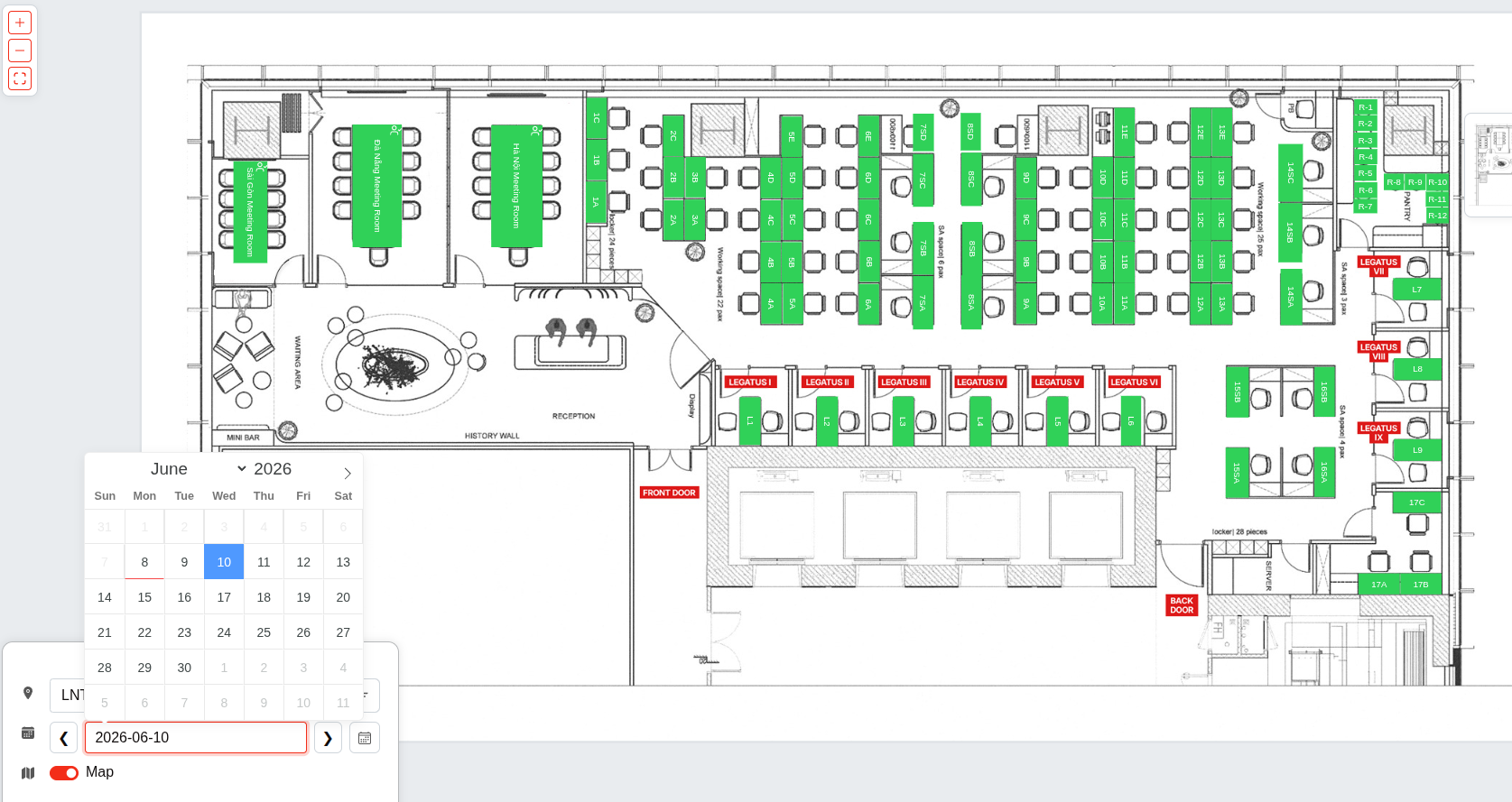
Unlike traditional, rigid form-based booking systems, this system displays a visual office layout. Users can see the status of each seat or area directly on the map. Green indicates available seats, red indicates reserved seats, and gray indicates areas where the user is not eligible to book. After a successful booking, the seat turns orange to easily identify that it has been reserved.
This display method creates a major shift in the user experience. Users don’t have to guess. They don’t have to ask. They don’t have to message administration. They don’t have to open multiple different calendar files. All the necessary information is on one screen: area, date, time, seat availability, and booking options.
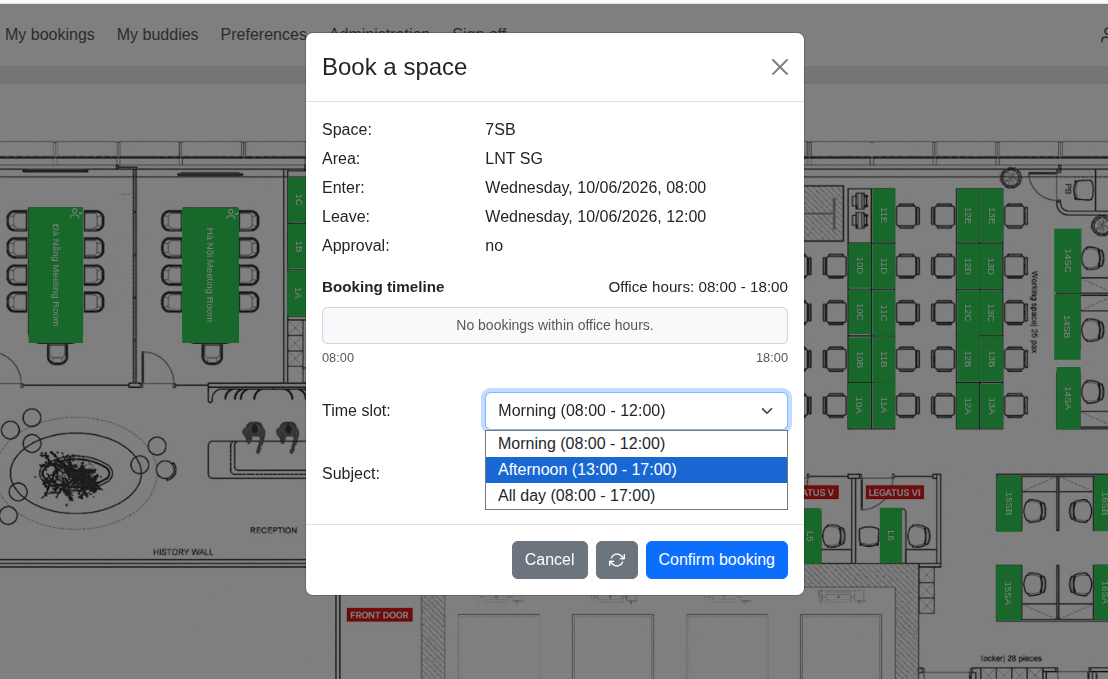
When a vacant slot is clicked, the system opens an information popup for user confirmation. The booking popup displays important information such as space, area, check-in time, check-out time, approval status, available slots, time slot, and booking details. Users select a suitable time slot, enter details if needed, and save. For recurring needs, the system supports daily or weekly booking cycles, allowing users to select the frequency, day of the week, and end date of the cycle. If there are no available time slots, the system displays a “No available time slots” warning to prevent duplicate or incorrect bookings.
At the management level, the system also supports approval status. If seating or space requires approval, the schedule, once submitted, will be in a Pending state and will only be confirmed when a manager or administrator approves it. If no approval is required, the booking is confirmed immediately upon completion. This is a crucial detail for businesses with multiple usage areas, critical meeting rooms, restricted areas, or resources requiring tiered access control.
The core features that create operational value.
A booking system is only truly valuable when it addresses both sets of needs: a fast experience for employees and clear control for the business. Based on the system documentation and communication materials you provided, the core features can be systematized as follows:
- Flexible login:Users access the site via a browser, logging in with a provided account/password or an integrated login method such as SSO.
- Book a Space interface:This allows users to quickly access the booking screen from the main navigation bar.
- Select your region, date, and time slot:Users select their desired office, floor, or work area, then choose their usage time.
- Visual office layout diagram:The floor plan is displayed in map format, allowing users to see the seating/meeting room availability in real time.
- Clear status color:Green indicates a vacant spot that can be reserved, red indicates a reserved spot, gray indicates no reservation rights, and orange indicates a spot that has been successfully reserved by a user.
- Booking details popup:It displays information about the space, area, check-in time, check-out time, approval status, booking timeline, time slot, and booking details.
- Book by time slot:Supports selecting time slots such as morning, afternoon, or all day depending on the configuration.
- Set a recurring schedule:Supports Daily or Weekly cycles, set Every, select days of the week, choose Until, Apply, or Reset.
- Warning: Seats are full.The system displays the message “No available time slots” if there are no suitable time slots available.
- Manage approval status:Approval Yes moves the schedule to Pending pending manager/admin approval; Approval No automatically confirms.
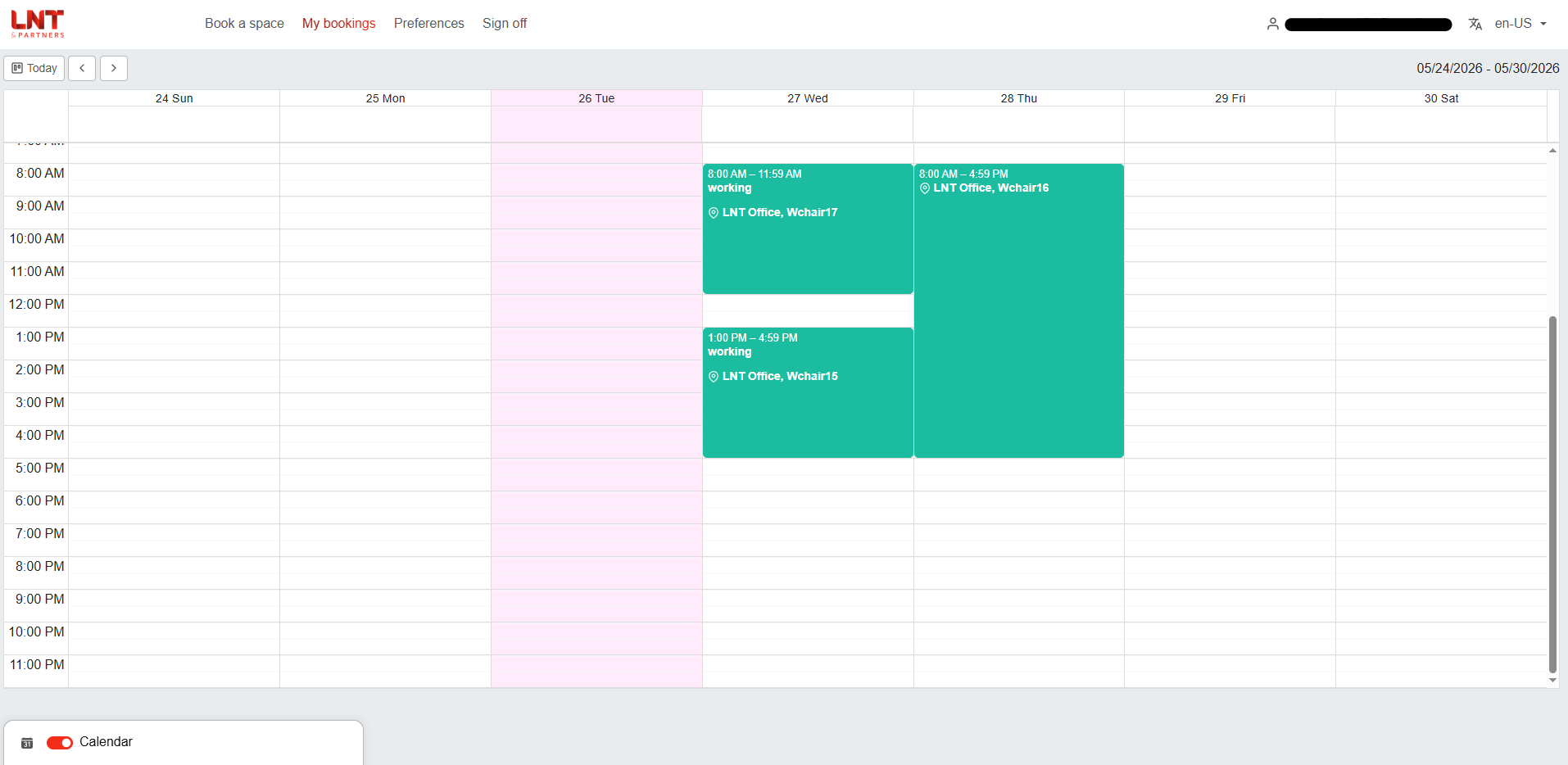
- My Bookings:Users can view all upcoming bookings in the personal calendar tab.
- The mechanism for changing the schedule is clear:The system does not directly edit already scheduled appointments; users need to cancel the old appointment and create a new one to ensure data consistency.
- Set working hours and working days:Default time: 09:00–17:00, Monday to Friday; the system automatically selects the time range when a booking is made.
- Priority area:Users can select the office or floor they frequently use for the system to display as the default.
- Account security:It supports passkeys such as Face ID, Touch ID, or device PIN, and also supports TOTP via Google Authenticator or a similar app.
- Integrating CalDAV:Booking schedules are synchronized with personal calendars in a one-way mechanism; changes on the system are reflected in personal calendars.
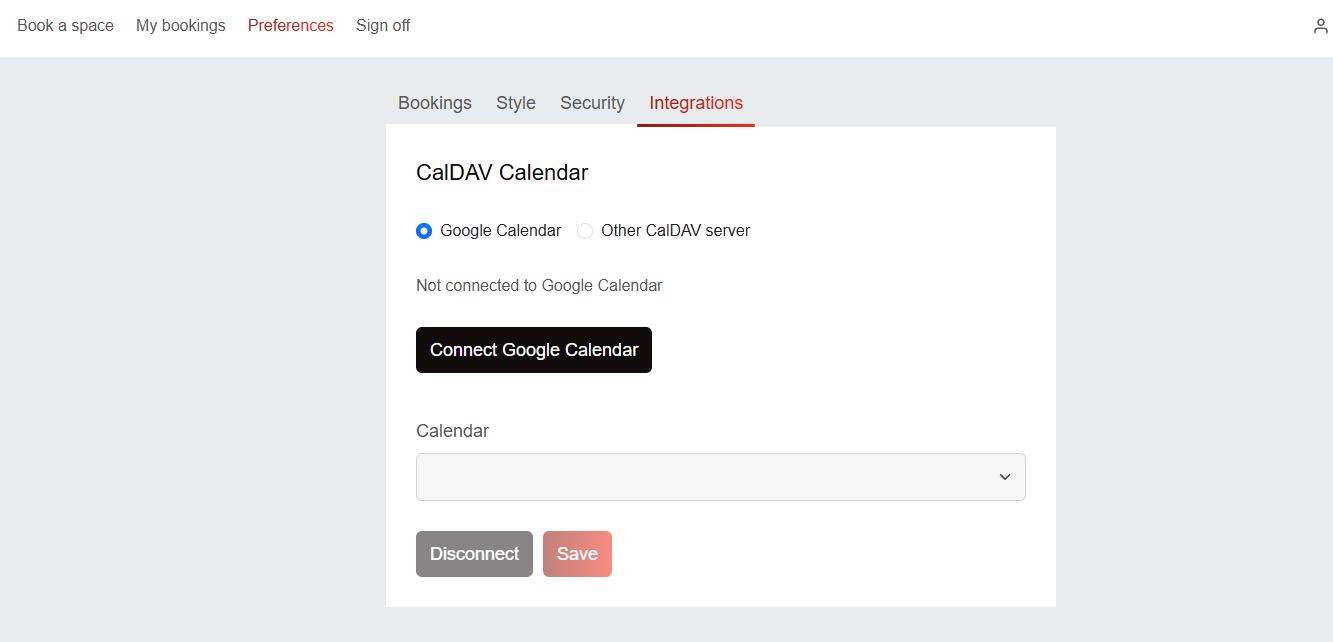
- Connect to Google Calendar:Users can connect their Google account, select the calendars they want to sync, and save the configuration so that the booked calendars appear in Google Calendar.
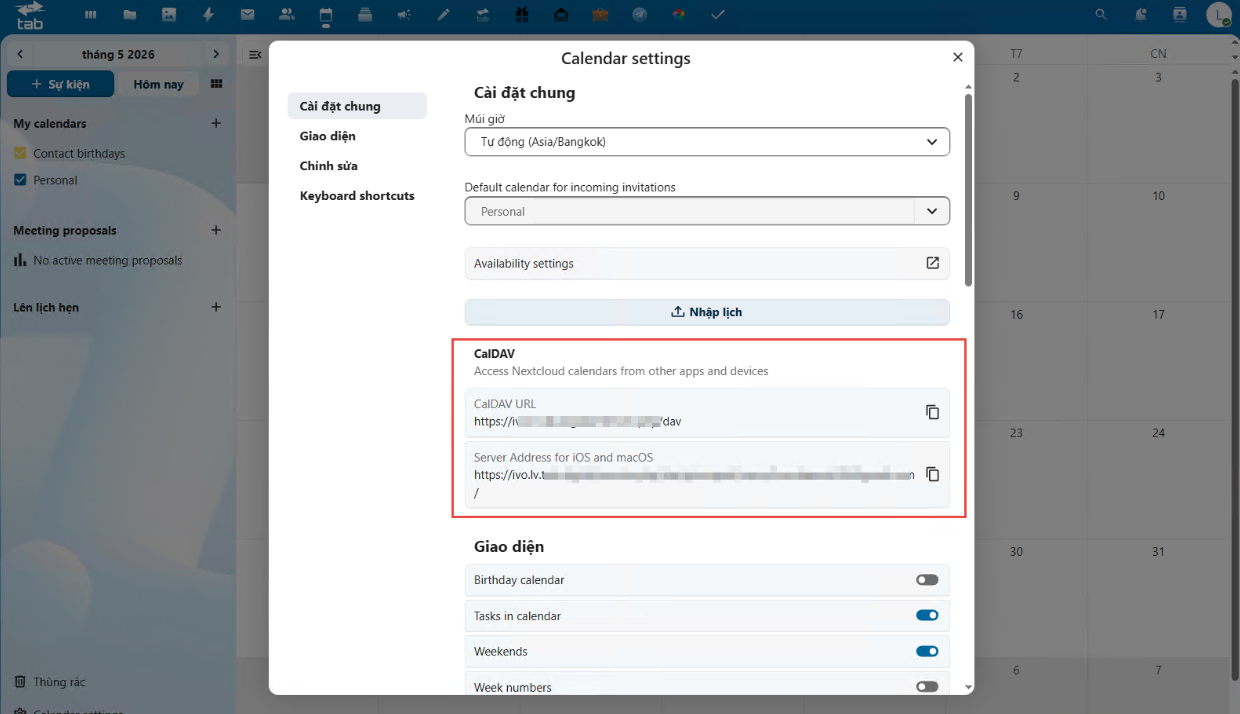
From a product communication perspective, these features shouldn’t be described simply as a list of operations. Their true value lies in how they form a closed-loop operational process: faster user bookings, better management control, more transparent data, and significantly reduced reliance on manual coordination for the business.
From bookings to administrative data: why should business owners care?
A business owner might ask, “What’s so important about securing office space that it warrants investing in a system?”
The answer lies in data and the efficiency of asset utilization.
Office space is one of the significant fixed expenses for many businesses. However, businesses don’t always know exactly how their space is being used. Some areas are always fully occupied during certain hours, while others are underutilized. Meeting rooms are frequently booked but underutilized. Some staff need to work in the office on a fixed schedule but require manual scheduling each week. Some teams require specific spaces, but the approval process is unclear.
With a booking system in place, these questions begin to be answered with data. Businesses can look at booking history to understand usage needs. They can see which areas need expansion, which areas need adjustment, which meeting rooms are overloaded, which time slots are in high demand, and which user groups require exclusive booking privileges. From there, decisions about space allocation are no longer based on intuition.
For port businesses, logistics companies, or organizations with multi-zone operating environments, the significance of a booking system is even broader. Workspaces can include executive offices, meeting rooms, shift areas, project team workstations, reception areas, or areas with restricted access for specific roles. By integrating all these spaces into a centralized system, businesses can reduce conflicts, standardize usage schedules, and create a foundation for expanding into other resource management challenges.
From a human resources perspective, the system enhances the work experience. An employee starts their workday with clarity: knowing where they’ll be sitting, during what hours, whether their schedule is confirmed, and whether it’s synchronized with their personal calendar. For managers, clarity comes from the ability to control permissions, approval status, and usage data. For leadership, the value lies in the ability to optimize office assets and upgrade operational capabilities.
This is also the overarching principle in many of ICSC’s contents: data is only most valuable when it is continuously updated and used to improve business efficiency. A modern booking system is the way to move office operational data from a fragmented state to a state that can be observed, controlled, and optimized.
ICSC and the digital transformation approach: technology must serve practical operations.
A notable aspect of ICSC’s approach to developing and communicating technology solutions is that it doesn’t place software at the absolute center. Instead, ICSC typically starts with the business’s operational challenges. Technology is developed to address a specific problem: standardizing processes, reducing manual operations, leveraging data, increasing transparency, and helping businesses make better decisions.
This mindset is quite evident in the workspace management and booking platform. The system isn’t just a screen for booking seats. It has a visual layout so users can understand the space status instantly. It uses color coding to reduce confusion. It has approvals to suit businesses with access control systems. It has recurring scheduling to cater to real-world work habits. It has My Bookings so users can manage their own schedules. It has configurable working hours, preferred areas, multi-layered security, and personal calendar integration so the system doesn’t stand alone, but becomes part of the daily workflow.
For businesses looking to revamp their booking management systems, especially those already finding the limitations of Excel, internal messaging, or disjointed calendar tools, now is the time to re-evaluate how the office is currently running. A good booking system doesn’t just make bookings faster; it helps businesses build a transparent, flexible, and scalable space management model.
In an era where every square meter of office space needs to be used efficiently, every piece of operational data can become a basis for decision-making, and every employee experience contributes to overall productivity, booking systems are no longer a minor amenity. They are part of a digital transformation strategy for the office.
With ICSC, the message “Innovating Together. Breaking Through with AI” is not only relevant to large-scale projects like ERP, AI Agents, or data analytics. It also starts at very close touchpoints in daily operations: a seat reserved at the right time, a meeting room free from scheduling conflicts, a workspace used transparently, and a manager with data to optimize space.
And sometimes, changing the way a business operates doesn’t start with a massive project. It begins with a very simple question: today, do your employees know exactly where they should be working?
Contact the ICSC solution consulting team
Email: info@icsc.vn
Tel: +84 28 37 15 07 81