

Can AI Connect to ERP? How to Turn ERP Data into Intelligent Action
When AI is connected to ERP correctly, businesses can do more than retrieve information faster. They can automate transactions, identify operational risks, and deliver trusted data to the right person at the moment it is needed.
An ERP system may already contain the answers to thousands of daily questions: how much stock is available, where an order is, which invoices are overdue, and which transaction needs attention first. Yet in many organizations, even a simple answer still requires employees to open several screens, search across modules, ask another department, and re-enter the same information manually.
The problem is not always a lack of data. The problem is that existing data does not appear at the right time, in the right context, or automatically lead to the next action. This is the gap AI can close when it is connected to ERP.
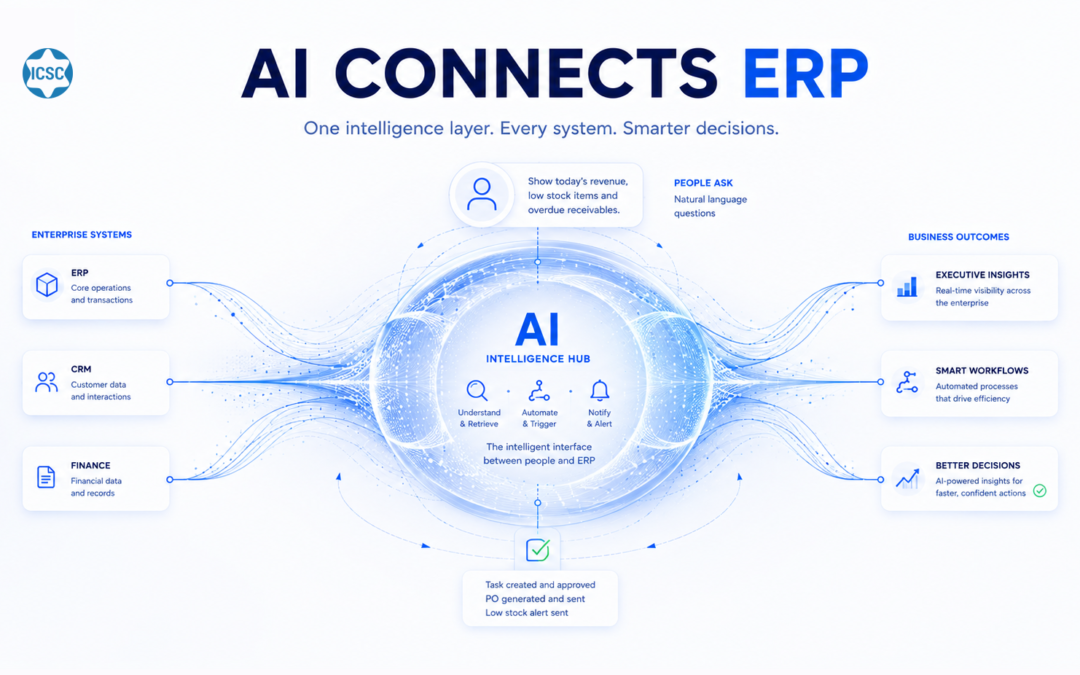
ERP holds the operational source of truth. AI turns that data into answers, alerts, and actions at the point of need.
Can AI connect to ERP?
Yes. AI can connect to ERP through APIs, webhooks, middleware, or, in special cases, controlled database access. With the appropriate permissions, AI can read inventory, pricing, order status, receivables, and customer data. It can also write approved information back to ERP, such as creating an order, updating a status, or recording a transaction under defined business rules.
What does AI-ERP integration mean?
AI-ERP integration is an architecture in which an AI system, AI agent, or conversational assistant is connected to enterprise resource planning software so it can use operational data in real time. ERP remains the system of record, where structured data and business processes are controlled. AI becomes an intelligent interaction and orchestration layer above it, allowing users to retrieve information or trigger approved processes through natural language and automation rules.
This does not mean AI replaces ERP. ERP continues to manage orders, inventory, accounting, procurement, manufacturing, human resources, or other core operations. AI reduces the distance between users and the data or functions that are otherwise buried inside the system.
Why can a data-rich ERP still produce slow responses?
ERP data creates value only when people can find and use it at the right moment. If employees must remember menu paths, understand internal field names, identify the correct report, and then copy the result into another tool, the process still depends heavily on manual effort.
This is especially visible in sales, customer service, receivables, procurement, and operations. A customer asks about an order, but the service team must wait for the warehouse. A sales representative needs stock information, but must open multiple screens. A manager needs a view of revenue, cost, and receivables, but must wait for several departments to prepare a report.
Once AI is connected to ERP, a user can ask in natural language while the system identifies the relevant data, checks access permissions, and returns an appropriate response. For approved tasks, AI can also create a transaction or hand off a workflow without forcing the user to re-enter the information.
What can AI do after connecting to ERP?
The value of AI-ERP integration usually falls into four functional groups. A business can begin with one focused use case instead of attempting to automate the entire system at once.
- Real-time data retrieval: an AI chatbot or internal assistant responds using current inventory, price, order status, receivables, or customer records from ERP.
- Transaction creation and updates: AI can help create a lead or order, update a status, record a request, or route information to the correct module under controlled rules.
- Proactive alerts and analysis: AI reviews ERP data to identify signals such as low stock, overdue invoices, delayed orders, or unusual transactions.
- Proactive alerts and analysis: AI reviews ERP data to identify signals such as low stock, overdue invoices, delayed orders, or unusual transactions.
How does AI connect to ERP?
The integration method depends on the technical capabilities of the current ERP, the data required, and whether AI is permitted to read or write information. The four common approaches are APIs, webhooks, middleware, and database access in special cases.
1. API integration: the preferred approach for modern systems
An API allows an external system to exchange data with ERP under predefined rules and permissions. Platforms such as SAP, Oracle NetSuite, Microsoft Dynamics, Odoo, and other ERP solutions may expose APIs at different levels. Through an API, AI does not need unrestricted access to the entire database. It calls only the approved function, such as reading stock, finding an order, or creating a customer record.
This is usually the most stable and controllable approach because it follows the architecture intended by the ERP provider. The business must still confirm which APIs are available, their usage limits, authentication method, and the exact data each endpoint may return.
2. Webhooks: allowing AI to react when an event occurs
A webhook allows ERP to notify the AI system whenever a defined event occurs, such as a new order, a delivery status change, or an invoice becoming overdue. Instead of repeatedly asking ERP whether anything has changed, AI can start the correct workflow as soon as the event is generated.
This is useful for real-time alerts, automated notifications, request classification, and event-driven workflows.
3. Middleware: when systems do not speak the same data language
A legacy ERP, a heavily customized implementation, or an environment with several systems may require middleware between AI and ERP. Middleware can standardize data formats, map field names, control integration flows, and expose a unified interface to the AI layer.
This reduces direct dependency on the internal structure of each application. When an ERP changes, the organization may update the middleware rather than rebuilding all AI logic.
4. Direct database access: only when it is genuinely necessary
Some internal or older ERP systems do not provide a suitable API. Controlled database queries may then be considered, but they should not be the default because they introduce security, data conflict, and structural dependency risks.
Where this approach is unavoidable, read-only access, replicated data, or an intermediate service should be preferred. Any write operation must be tightly controlled, logged, and tested before production use.
Practical use cases for AI connected to ERP
Integration creates value only when it solves a specific operational problem. The table below shows how ERP data may support several common enterprise AI use cases.
| Use case | ERP data used | Business value |
|---|---|---|
| Customer-service AI chatbot | Inventory, pricing, order status | Responds using current data and reduces incorrect availability or fulfilment information. |
| AI lead or request capture | Customer master and transaction history | Creates a record, checks for duplicates, and routes the request to the right team. |
| AI-assisted receivables follow-up | Invoices, balances, payment history | Prioritizes and supports reminders using accounting data. |
| Inventory alerting | Receipts, issues, stock levels, pending orders | Identifies potential shortages or excess stock for review. |
| Management reporting assistant | Revenue, cost, receivables, orders | Creates a combined view without manually exporting and merging several reports. |
What does an AI-ERP workflow look like?
Suppose a customer asks a chatbot, “Has my order been shipped?” The AI first identifies the customer or order number, then calls the ERP API to retrieve the current status. If the order has left the warehouse, the assistant provides the appropriate information. If the order has exceeded a defined delay threshold, AI may create a support request or hand the conversation to the responsible employee according to the configured rule.
For a write-back scenario, a customer may ask to order an item that is currently available. AI collects the required information, validates mandatory data, asks the customer to confirm, and only then sends an order-creation request to ERP. ERP still applies business validation, assigns the document number, keeps the audit trail, and moves the order through the next operational steps.
AI should not be allowed to change every record freely. Each action needs a defined scope, conditions, and approval level. High-risk transactions may be proposed for human approval, while repetitive and low-risk tasks can be automated further.
Is it safe to connect AI to ERP?
The concise answer
It can be safe when the integration follows least-privilege access, strong authentication, two-way data controls, complete logging, and approval rules for sensitive actions. Risk usually appears when AI is given overly broad permissions or is allowed to write data without business validation.
AI should be treated as a system user with a specific role, not as an unlimited gateway. Each function should use a dedicated service account with an explicit data scope that can be monitored and revoked.
- Role-based access: an order-status chatbot does not need permission to edit accounting data or view all sensitive information.
- Secure authentication and transport: API keys, tokens, and credentials must be stored and rotated safely.
- Validation before write-back: ERP should continue to enforce mandatory fields, duplicate checks, and business rules.
- Logging and traceability: record the request, data accessed, action performed, timestamp, and result.
- Approval controls: sensitive, high-value, or financially material transactions should require authorized confirmation.
- Data minimization: send only the information required for the current question or task to the AI model.
Which businesses should prioritize AI-ERP integration?
The approach is valuable when operational data already exists in ERP but remains slow to use. Common signs include repeated lookup work, customers waiting for confirmation, duplicate entry between systems, and managers relying on manually assembled reports.
A business does not need a very large ERP to begin. A smaller sales, inventory, or operations platform may support a focused integration if it provides an API or a clear data-exchange mechanism. The deciding factors are whether the use case is specific and whether the source data is reliable.
If ERP data is inconsistent, duplicated, or lacks clear process ownership, the organization should improve the data and operating foundation first. AI can make data easier to access, but it cannot automatically turn incorrect data into a correct decision.
A phased roadmap for AI-ERP integration
An effective project begins with a small use case that produces measurable value. A phased approach reduces risk and validates the integration before expansion.
Phase 1 – Define the use case and required data
Choose one concrete situation, such as stock lookup for sales, order-status responses for customers, or receivables reminders. Identify where the data is stored, who may access it, the expected response, and when the process must be escalated to a person.
Phase 2 – Build the connection and control layer
Evaluate APIs, webhooks, or middleware; configure authentication, permissions, data mapping, error handling, and logs. Read-only access or a test environment is usually the right starting point before enabling write operations.
Phase 3 – Pilot within a limited scope
Run the solution with a defined user group, dataset, or process. Measure response accuracy, speed, errors, escalation cases, and user adoption.
Phase 4 – Expand automation and reporting
Once the data and control layers are stable, AI can create or update approved transactions, combine CRM or conversation data, and introduce proactive monitoring.
How should the business measure success?
Success should not be measured only by the number of AI queries. The key question is whether the workflow becomes faster, more accurate, and less repetitive. Depending on the use case, metrics may include information-retrieval time, first-contact resolution, manual steps removed, correction rates, receivables handling time, or report preparation time.
For write-back functions, track the percentage of correctly created transactions, rejected requests, error causes, and cases requiring human approval. These indicators help determine which processes should be automated further and which still require manual control.
Frequently asked questions about AI and ERP integration
Can AI connect to every ERP system?
Most modern ERP systems with APIs or defined data-exchange capabilities can be integrated. A legacy or internally developed ERP without APIs may still be connected through middleware or a dedicated data approach, but the project is usually more complex.
Can AI both read and write ERP data?
Yes. Read and write permissions should be separated. Write operations such as creating orders or updating statuses must pass business validation, logging, and appropriate approval controls.
Will AI change the original data in ERP?
Only when it is given write permission and sends an approved update. ERP should remain the final control point and may reject invalid transactions. Read-only functions do not need to modify the source data.
Can a small business connect AI to its ERP or management software?
Yes. A small organization can start with a narrow function such as inventory lookup, order status, or lead capture. The application needs an API, import/export capability, or another suitable integration method.
Can AI connect to an on-premise ERP?
Potentially, yes. The architecture must match internal security and infrastructure policies. A gateway, middleware, or components deployed inside a controlled environment may be used depending on the technical and data requirements.
How long does AI-ERP integration take?
The timeline depends on API readiness, data quality, ERP customization, the number of processes, and security requirements. A read-only use case on a standard API is generally simpler than two-way integration across a legacy or multi-system environment.
Does a company need to replace its ERP before using AI?
Not necessarily. AI can often be implemented as an integration layer above the existing system. Deeper replacement is considered only when the ERP cannot expose required data or when the underlying process has serious limitations.
How ICSC supports AI integration with existing ERP systems
Every ERP implementation has a different structure, customization level, and security policy. A suitable integration therefore begins by understanding the current system, the data to be used, and the actions AI genuinely needs to perform.
ICSC approaches the engagement by reviewing the business process first and the integration architecture second. The team works with the organization to identify the priority use case, data flow, permissions, control criteria, fallback behavior, and the appropriate connection method through APIs, webhooks, or middleware.
A project may begin with an ERP data chatbot, an internal employee assistant, AI-assisted data entry, receivables alerts, or management reporting. Once the value is verified, the scope can expand to two-way automation and additional connections with CRM, messaging channels, or other operational platforms.
The objective is not to put AI into ERP at any cost. It is to deliver the right data to the right person and turn repetitive work into a faster, controlled, and measurable process.
For an initial assessment, the business should prepare two pieces of information: the ERP or management software currently in use, and the specific problem AI should solve with that data. ICSC can then recommend an integration architecture and phased roadmap aligned with the existing environment.
Contact Information
Please contact ICSC’s solution consulting team.
Email: info@icsc.vn
Tel: +84 28 37 15 07 81